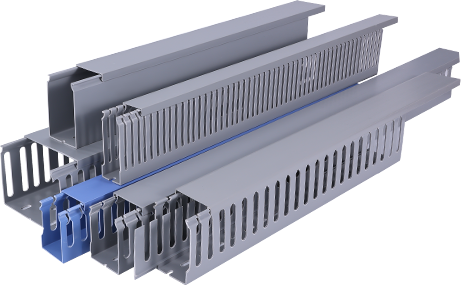
Cable management ducts are an essential component in modern office spaces, data centers, and other environments where cables are abundant. These ducts not only help in organizing cables but also contribute significantly to the overall efficiency and safety of the workspace. In this comprehensive guide, we will delve into the various aspects of cable management ducts, including their types, benefits, installation, and maintenance.
**Introduction**
The proliferation of electronic devices in our daily lives has led to an increase in the number of cables required to connect these devices. This has made cable management a crucial aspect of any workspace. Cable management ducts are designed to streamline the process of organizing and securing cables, thereby reducing clutter and enhancing productivity.
**Types of Cable Management Ducts**
There are several types of cable management ducts available in the market, each with its unique features and applications. Some of the most common types include:
1. **Surface Mount Ducts**: These ducts are mounted on the surface of walls, floors, or ceilings. They are ideal for organizing cables in open office spaces and under desks.
2. **Rack-Mount Ducts**: Designed for use in server racks and cabinets, these ducts help in managing cables within the equipment itself.
3. **Concealed Ducts**: These ducts are installed within walls or ceilings, providing a clean and organized appearance while keeping cables out of sight.
4. **Cable Trays**: Cable trays are used to support and route cables overhead. They come in various sizes and configurations to accommodate different cable loads and routing requirements.
**Benefits of Cable Management Ducts**
The use of cable management ducts offers several benefits, including:
1. **Improved Organizational Efficiency**: By keeping cables organized, cable management ducts help in reducing clutter and making it easier to locate and manage cables when needed.
2. **Enhanced Safety**: Properly managed cables reduce the risk of tripping and electrical hazards. This is particularly important in high-traffic areas or where sensitive equipment is present.
3. **Increased Productivity**: A well-organized workspace is more conducive to productivity. Employees can focus on their tasks without being distracted by tangled cables.
4. **Scalability**: Cable management ducts can be easily expanded or reconfigured to accommodate changes in the workspace or the addition of new equipment.
**Installation of Cable Management Ducts**
Installing cable management ducts requires careful planning and execution. Here are some key steps to consider:
1. **Assess Your Needs**: Determine the type and size of cable management ducts required based on your specific requirements.
2. **Choose the Right Location**: Identify the areas where cable management is most needed, such as under desks, around equipment, or overhead.
3. **Install the Ducts**: Follow the manufacturer’s instructions for installing the ducts. This may involve mounting them on walls, ceilings, or floors, or routing them through walls or ceilings.
4. **Route the Cables**: Once the ducts are installed, route the cables through them, ensuring they are organized and secure.
**Maintenance of Cable Management Ducts**
Regular maintenance is essential to ensure the longevity and effectiveness of cable management ducts. Here are some maintenance tips:
1. **Regular Inspection**: Check the ducts regularly for signs of wear and tear, such as cracks or loose connections.
2. **Clean the Ducts**: Dust and debris can accumulate in the ducts, so it’s important to clean them periodically to prevent clogs and maintain airflow.
3. **Replace Damaged Components**: If any part of the ducts is damaged, replace it promptly to avoid potential hazards.
**Conclusion**
Cable management ducts are an invaluable tool for organizing and securing cables in modern workspaces. By choosing the right type of duct, installing it correctly, and maintaining it regularly, you can enhance the efficiency, safety, and productivity of your workspace.